


Blood Pressure Diary
4.85.22K Reviews
App Specs
- Version
- 0.1.20
- Updated On
- License
- Free
- Downloads
- 1,000,000+
- Developer
- Health & Fitness AI Lab
- Categories
- Medical
- Platform
- Android, iOS
Screenshots
 Analysis by AppCompare
When I think about a health app being inclusive, I look beyond whether its screens seem simple at first glance. The useful question is whether someone can fit it into the way they actually take readings: in a quiet morning routine, during a busy day, or with another person helping. Blood Pressure Diary is a medical app from Health & Fitness AI Lab, and its focus is keeping a record of blood pressure and pulse. I see that narrow purpose as a strength for people who want a diary rather than a complicated health platform, though it also means the app is not a substitute for a blood pressure monitor or clinical advice.
Using a blood pressure diary in everyday life
I find a blood pressure diary most useful when it fits neatly around the measurement routine rather than becoming a separate chore. A practical habit is to keep the monitor, phone, and a pen together, so you can record a reading promptly or jot it down first if using the phone is awkward at that moment. That small backup can help preserve accuracy, and it leads naturally to the question of how comfortable the app is to use on different screens and for different people.
Readability and navigation: a focused tool, not a health dashboard
The app’s straightforward role matters for readability: a record-keeping tool is easier to approach when the main task is entering a measurement, not finding a particular feature among unrelated sections. The store identifies it as a free app, and its Everyone age rating makes it broadly accessible in terms of intended audience. It has a 4.8 average from around 124,000 ratings, but I would treat popularity as context rather than proof that it will suit every person’s needs.
If you are helping a relative, it can be useful to agree on a simple routine before opening the app: take the reading, enter it promptly, and add a brief note only when something could help explain the context. That keeps the diary from becoming a memory test later. It also avoids turning a quick log into a long writing task, which can be a real barrier for someone who finds small-screen typing tiring.
Motor and sensory considerations: keep the logging routine manageable
Blood pressure tracking depends on entering numbers accurately, so the best workflow is one that reduces distraction. I would take the measurement first and record it while the values are still visible, rather than trying to remember them after moving on to another task. If a family member assists, it is worth saying the figures aloud and checking the entry together; that is a simple safeguard against transposed digits, not a feature of the app.
For anyone with low vision, hand tremors, limited dexterity, or difficulty reading a screen, the phone’s own display and accessibility settings may make a difference. I would test the actual entry process on the device the person will use, including whether the text is comfortable to read and whether tapping the necessary controls feels reliable. A clean-looking interface does not automatically solve every access need, and a caregiver-assisted routine may be more practical than insisting someone use the app independently.
Situational access: make the record useful beyond the moment
The app is most helpful when it supports a repeatable habit rather than an occasional burst of logging. A person who takes readings at home can keep the phone and monitor in the same place, then enter results after sitting quietly and completing the measurement. If the day is rushed or the person is away from home, it may be better to wait until they can enter the figures carefully than to rely on a hurried note that could be misremembered.
Worth Reading Before You Choose

Flipboard Shows What News Apps Must Do Beyond the Feed

Switching to Android Auto Means Rethinking Your Driving Routine

Google Calendar Makes a Crowded Week Easier to Manage

Ludo King Makes the Most of the Minutes Between Plans

Baby Panda World Brings Quick Play to Modern Phones, but Its Game Library Feels Busy

ESPN’s Live Game View Makes Following Close Games Easier
For a clinician visit, I would use the diary as a conversation aid: bring the device or a record of the readings and explain when they were taken. A run of entries can give more context than one isolated result, but it does not diagnose a condition. If a number worries you, follow the advice of a healthcare professional rather than letting a chart or color cue make the decision for you.
Where this kind of app fits—and where it does not
Compared with a paper notebook, a phone diary is easier to carry and can make it simpler to review entries together, but paper may be more comfortable for someone who dislikes screens or struggles with phone controls. Compared with a broader health tracker, a focused blood pressure app may feel less cluttered for this one task; the trade-off is that people wanting a single place for many kinds of health records may prefer a wider platform.
I would recommend this kind of tool to someone who already has access to a suitable blood pressure monitor and wants a consistent place to keep readings. It can also help a caregiver organize a relative’s measurements, provided everyone is clear about whose record is being entered. I would skip it if you expect the app itself to measure blood pressure, interpret symptoms, or replace professional guidance. A diary is only as useful as the measurements and entries put into it.
Remaining barriers and an inclusive verdict
Some practical questions are worth answering before making it part of a routine. The app is free, but the user still needs a phone and a separate way to take a blood pressure reading. If entering a measurement feels difficult, a paper record or help from a trusted person may be more dependable. If the phone is shared, take care to keep each person’s readings clearly separated; a mistaken identity can make an otherwise tidy record misleading.
Another trade-off is consistency. A diary can help reveal patterns only when entries are recorded in a reasonably regular way, and gaps should not be treated as evidence that nothing changed. I would choose a reminder schedule that fits the clinician’s instructions and the person’s daily routine, rather than setting alerts so often that they become easy to ignore. The current version is 0.1.20, and the app has been available since Nov 29, 2018; what matters most in practice is whether its current behavior works comfortably on the device and for the person using it.
Overall, I see Blood Pressure Diary as a practical option for people who want a straightforward record and are comfortable entering readings on a phone. Its focused purpose can make the habit easier to understand, while the need for careful manual entry and a separate measuring device sets clear limits. With more than 1 million installs, it is an established choice, but the right decision still comes down to access: if the screen, controls, or routine do not work for you, use a format you can maintain accurately and discuss your readings with a healthcare professional.
Getting Started with Blood Pressure Diary
First things first, downloading Blood Pressure Diary is a breeze. Available on both Android and iOS, it took me just a couple of minutes to get it up and running. Once installed, I was greeted with a simple and intuitive interface that even my grandma could navigate. Honestly, it's like having a personal health assistant right in your pocket.
Logging Your Measurements
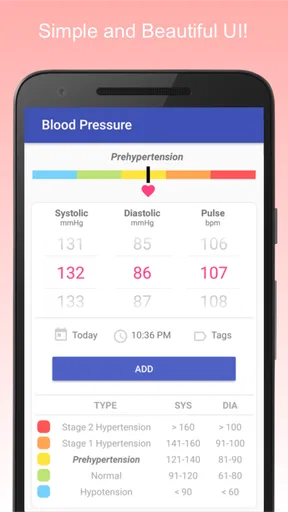
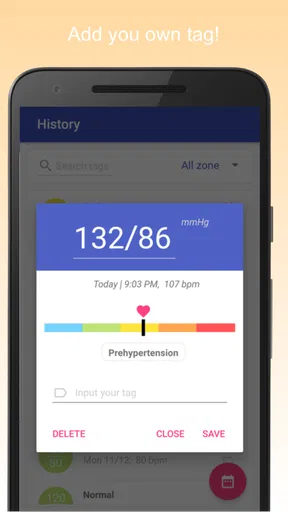
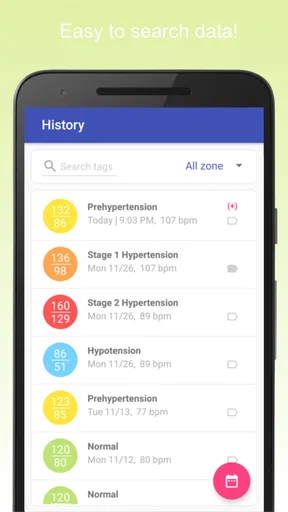
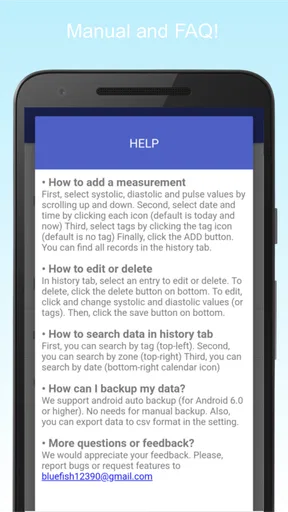
The app makes it incredibly easy to log your blood pressure readings. All you need to do is enter your systolic and diastolic numbers, along with your heart rate. What's cool is that you can also add notes about how you were feeling at the time of the reading. Having this extra bit of detail really helps in understanding trends over time.
If you're someone who forgets to log regularly, the app has got you covered with customizable reminders. I set mine for every morning, and it’s been a game changer. No more forgetting until it’s too late!
Visualizing Your Health Data
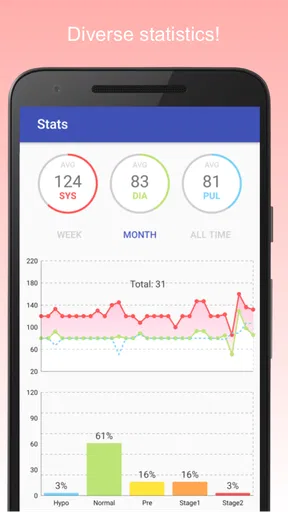
One of my favorite features is the graphing tool. The app automatically creates graphs of your readings over time. It's super handy to visually see how your blood pressure fluctuates, and it’s a great way to share your data with your doctor. Just a quick screen capture, and you’re all set for your next appointment.
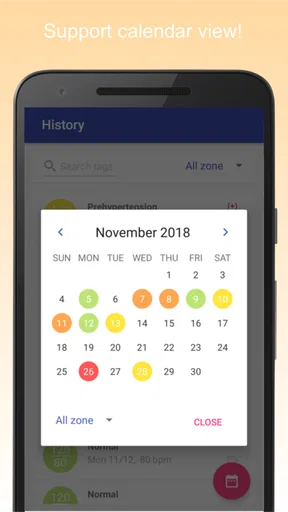
There’s even a color-coded system to quickly show you if your readings fall within a healthy range. It's as if the app is gently nudging you towards better health habits.
Security and Data Backup
Now, I know data security is a big deal for many of us. Thankfully, Blood Pressure Diary allows you to back up your data to the cloud or locally on your device. I personally prefer the cloud option because it means I won’t lose my records if I switch phones. Plus, everything is encrypted, so my data feels safe and secure.
Additional Features Worth Mentioning
Besides the core functionalities, the app also offers some neat extras. For example, there’s a section for managing medications, which I found super useful. You can log what you're taking, at what dosage, and set reminders so you never miss a dose.
Additionally, the app supports multiple profiles. So, if you’re keeping tabs on your family's health, you can do it all from one place. It’s like a health diary for the whole household!
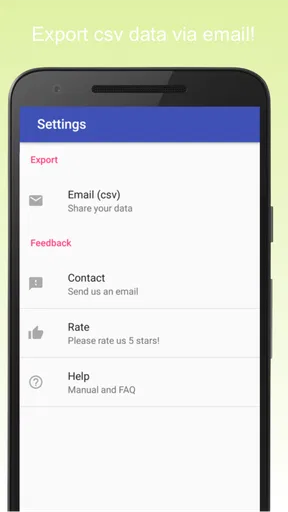
And let’s not forget about the export feature. With a few taps, you can export your data into a PDF or CSV file. This makes sharing with healthcare professionals a cinch.
Wrapping It Up
All in all, I’ve been really impressed with Blood Pressure Diary. It's intuitive, comprehensive, and genuinely useful for anyone looking to keep a close eye on their blood pressure. Whether you're managing a chronic condition or just want to stay proactive about your health, this app is a fantastic tool to have at your disposal.
If you're interested in checking it out, you can find it on the Play Store or App Store. Go ahead, give it a try, and see how it can help you stay on top of your health game!
Pros
- Simple and intuitive interface.
- Tracks blood pressure trends effectively.
- Customizable reminders for entries.
- Data export to PDF or CSV format.
- Secure data backup options.
Cons
- Ads can be intrusive at times.
- Limited features in the free version.
- No integration with fitness trackers.
- Requires manual data entry.
- Lacks multi-user support.
FAQs for Blood Pressure Diary
What features does Blood Pressure Diary offer?
Blood Pressure Diary provides users with a comprehensive set of features to track and monitor their blood pressure. It includes daily logging, graphical analysis, trend tracking, and reminders for medication. The app also offers data export options, making it easy to share your health information with healthcare professionals.
Is Blood Pressure Diary suitable for all age groups?
Yes, Blood Pressure Diary is designed to be user-friendly for all age groups. Whether you're a young adult managing early hypertension or an older individual monitoring chronic conditions, the app's intuitive interface and customizable settings make it accessible and useful for everyone.
Can I sync Blood Pressure Diary with my wearable devices?
Blood Pressure Diary supports synchronization with various wearable devices and smartwatches. This allows for automatic data entry and real-time monitoring, ensuring that you have the most accurate and up-to-date information about your blood pressure trends right at your fingertips.
Does Blood Pressure Diary require an internet connection to function?
No, Blood Pressure Diary can operate offline. You can log your readings and access your data without an internet connection. However, for data backup and syncing with cloud services, an internet connection is necessary to ensure your information is securely stored and accessible.
How secure is my data on Blood Pressure Diary?
Blood Pressure Diary prioritizes user privacy and data security. The app uses encryption to protect your information and offers options for password protection. Additionally, you can choose whether to store your data locally or sync it with secure cloud services for added peace of mind.


